The system processes requests for new accounts about every 4 hours, so you might have to wait up to 4 hours before you can do the next step.
After your account is created, you should be able to go to www.birdnest.org/yourid to see your homepage. Again, if you are John Smith, then the address of your birdnest page will be www.birdnest.org/smithj4. It should show up as something very simple, such as "replace this with default.htm".
To make Step Four easier, name your file default.html
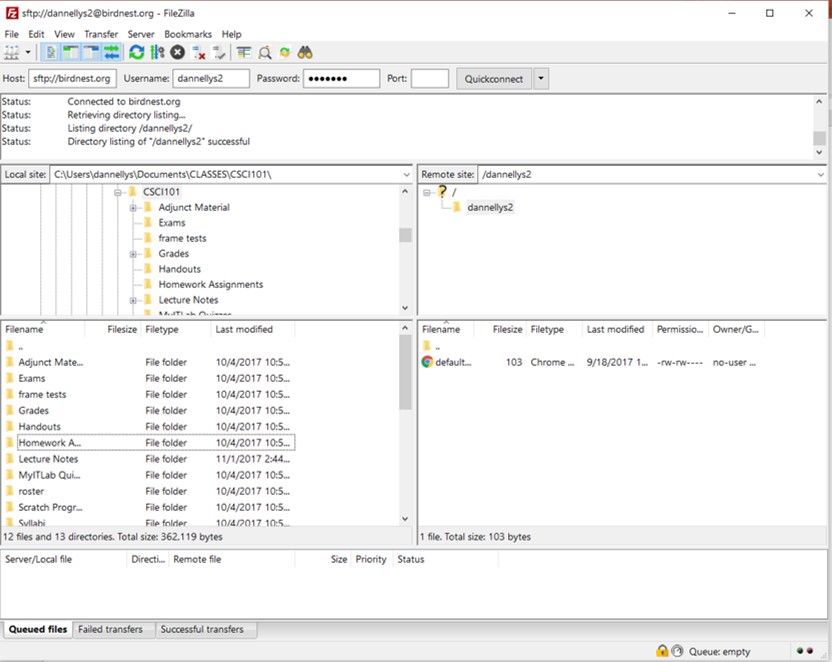
You will need an FTP (file transfer protocol) program to help you move files from your machine to the birdnest web server. I suggest Filezilla. You want the "client" program. The plain version is free.
Filezilla will probably ask you if it is okay to accept a secure connection to Birdnest. Click ok.
Using the navigation panes on the left, find your HTML file. Right-click the file and select "Upload". That should send the file to the server. If the file is named "default.htm", then the server will complain that you already have that file. Just tell Filezilla to replace the old copy of the file.